SquadCast Review: The Recording Platform Creators Actually Need
Remote interviews feel exciting until you hit record and remember you are at the mercy of someone else’s Wi-Fi. Voices glitch, guests freeze mid-thought, and suddenly your audio sounds like it traveled through a blender. Anyone who produces podcasts or video conversations knows this frustration too well.
That is the problem SquadCast aims to solve. Instead of recording the live call like Zoom or Meet, SquadCast captures each participant locally on their device and uploads the files as the conversation unfolds. The end result is cleaner and more stable, even if the call itself had issues.
One of the things people appreciate immediately is that it runs in the browser. Guests do not need to download anything. They click a link, you both record, and the platform handles capture in the background. This reduces onboarding stress for guests and makes scheduling interviews far simpler.
Once you are inside, the experience feels intentionally built for creators. The dashboard does not overwhelm you. You can see recordings, upcoming sessions, templates and basic branding tools without digging through menus. When you record, every speaker gets their own track. If someone coughs, interrupts, or their environment intrudes, you can clean it up without affecting everyone else. Video podcasters benefit as well, because SquadCast can record up to 4K and sync tracks across participants.
There is also an important connection worth noting. In 2023, SquadCast was acquired by Descript. If you already edit with Descript, SquadCast fits into your workflow almost seamlessly. Files move between the platforms, which reduces exporting, uploading and waiting around for transfers. It is a practical convenience that becomes noticeable the more you record.
SquadCast does not try to be everything. It will not edit your episodes, mix audio, or distribute your final content. You still need software like Descript, Audacity or Premiere for editing. It does not replace hosting platforms either, so publishing remains a separate step.
There are also a few practical limitations. The trial period is short before you are encouraged into a paid plan. Guests using Safari can run into compatibility issues and may need help switching browsers. And while the interface seems simple, new users still have to pick microphones, camera inputs and settings before recording, which can make some people hesitate.
So who is SquadCast really for? It works best for interview based creators, remote co hosts, podcasters who care about clean audio, and video creators who want 4K recording without complicated hardware setups. If you want a platform that simply records well and gets out of the way, this one makes a lot of sense.
If what you need instead is an all in one solution that records, edits and publishes everything in one environment, SquadCast will feel incomplete. It was not built for that purpose.
The appeal of SquadCast comes through in a quiet way. It is reliable, it respects the creator workflow, and it solves a real problem without demanding extra attention. For many people, that is exactly the kind of tool worth keeping.
If remote recording is a core part of your content, SquadCast deserves consideration. If you want a system that does everything under one login, this will not replace the rest of your setup. But if you have ever dreaded whether your interview will survive a bad internet connection, SquadCast offers a more dependable path forward.
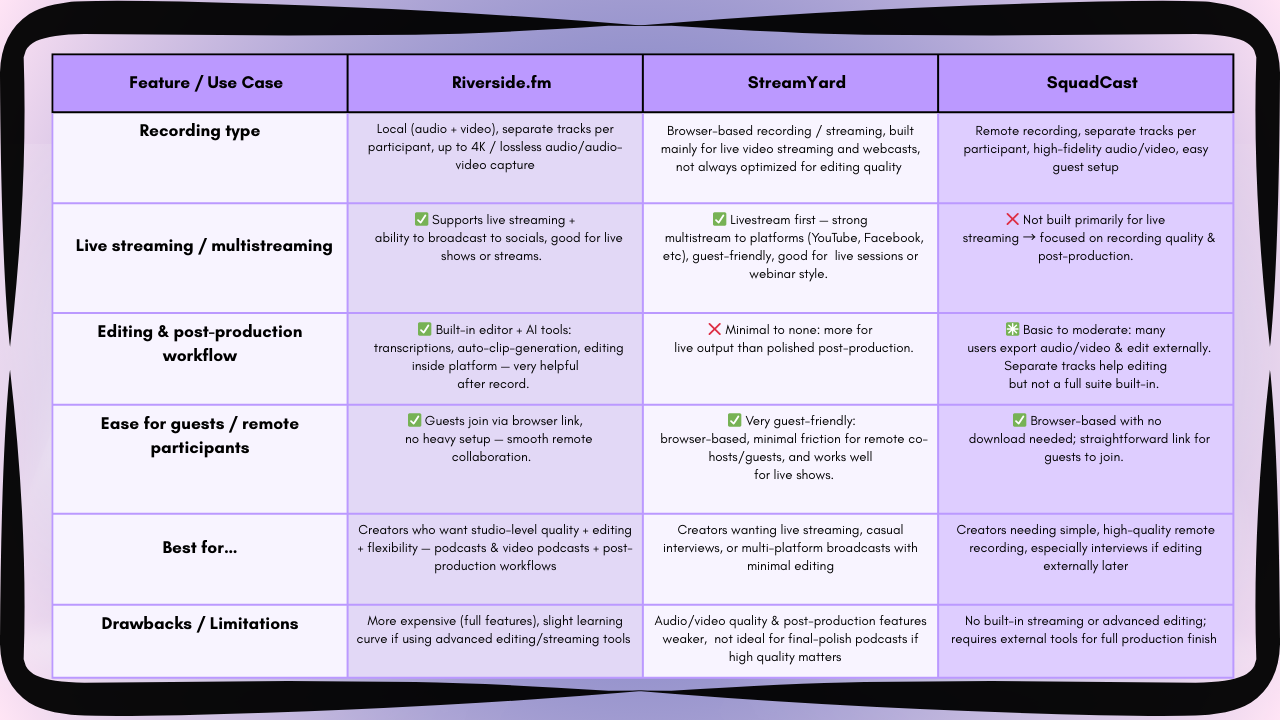
More Help to decide which is Platform is best for you!
Created By GBRLIFE LLC

Created By GBRLIFE LLC
If You Loved This, You’ll Love These Too:


Have You Heard The Latest Episode of GBRLIFE of Crimes?
GBRLIFE has so much more: